오늘의 학습
1. 개발 진행 상황
- BinaryContent 저장 로직 고도화
- 로컬 저장 방식으로
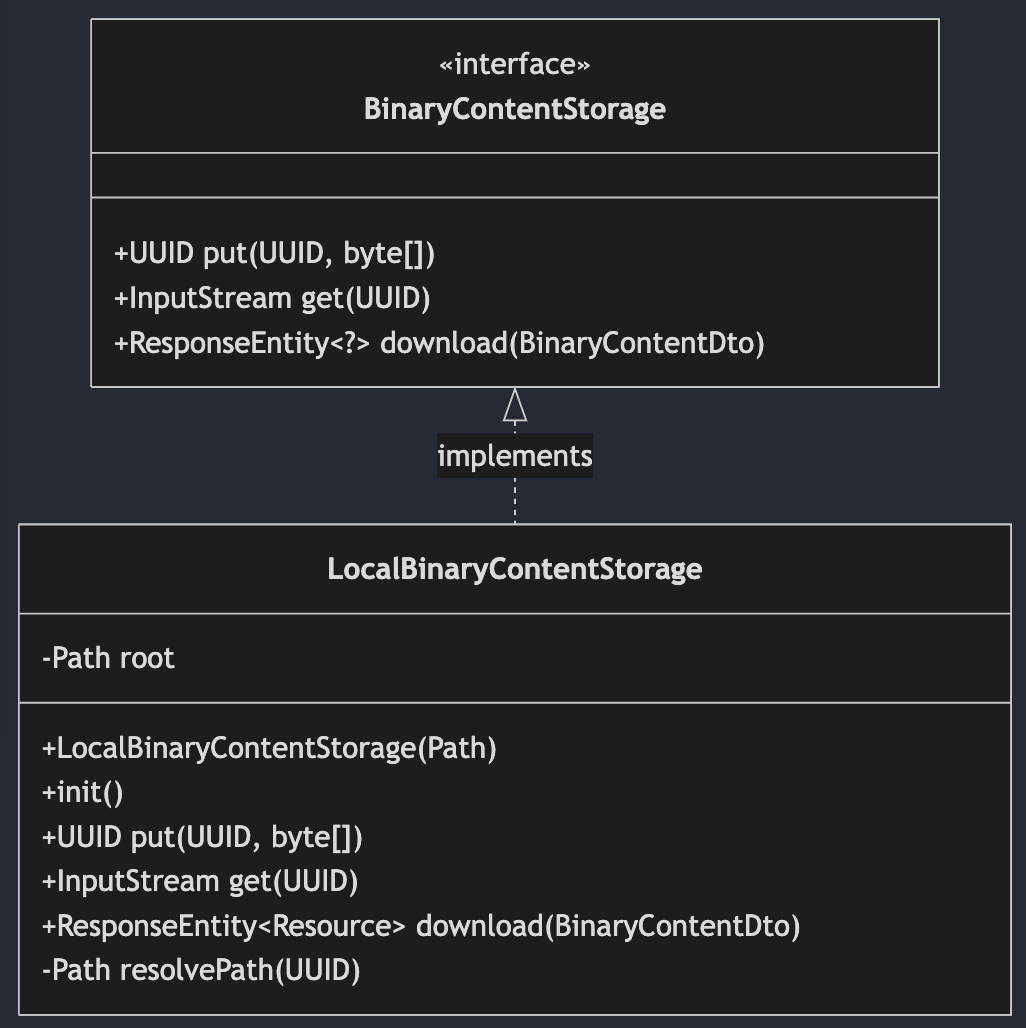
BinaryContentStorage구현체를 구현 (LocalBinaryContentStorage)- 루트 경로 :
Path root - Bean 생성 시 자동으로 호출되어 디렉토리를 초기화하는 메서드 :
void init() - 파일의 실제 저장위치에 대한 규칙을 정의하는 메서드 :
Path resolvePath(UUID) - 바이너리 데이터 다운로드 메서드 :
ResponseEntity<Resource> download(BinaryContentDto)
- 루트 경로 :
- 로컬 저장 방식으로
2. 고민
파일 다운로드 처리 과정
 /**
 * 파일의 실제 저장 위치에 대한 규칙을 정의 <br>
 * 파일 저장 위치 규칙 예시 : {@code {root}/{UUID}} <br>
 * {@code put}, {@code get} 메서드에서 호출해 일관된 파일 경로 규칙을 유지
 * @param binaryContentId
 * @return {@code Path}
 */
 public Path resolvePath(UUID binaryContentId) {
     // root 하위 경로로 새로운 Path를 만듬
     // root = "/storage/binary" 이면 "/storage/binary/UUID.toString"이 만들어짐
     return root.resolve(binaryContentId.toString());
 }

 @Override
 public InputStream get(UUID binaryContentId) {
     Path path = resolvePath(binaryContentId);

     try {
         // 파일을 읽을 수 있는 통로를 연다.
         return Files.newInputStream(path);
     } catch(IOException e) {
         throw new IllegalStateException("조회 실패", e);
     }
 }

 @Override
 public ResponseEntity<Resource> download(BinaryContentDto binaryContentDto) {
     // Resource 타입 : Spring에서 파일, 스트림 같은 데이터 자원을 표현하는 타입

     // InputStream :  바이트 데이터를 읽기 위한 통로
     InputStream inputStream = get(binaryContentDto.id());

     // InputStreamResource : Resource의 구현체 중 하나로
     // 이미 얻어온 InputStream을 Spring이 처리하기 쉬운 Resource 형태로 감싼다.
     // Spring은 ResponseEntity의 body로 파일/스트림 같은 자원을 보낼 때 Resource 타입을 잘 처리한다.
     Resource resource = new InputStreamResource(inputStream);

     return ResponseEntity.status(HttpStatus.OK)
             // Content-Type 헤더 설정
             // MediaType.parseMediaType(type) : type(`image/png` 등)을 Spring의 MediaType 객체로 변경
             .contentType(MediaType.parseMediaType(binaryContentDto.contentType()))
             // Content-Length 헤더 설정
             // 응답 본문 크기가 몇 바이트인지 알려주는 헤더
             .contentLength(binaryContentDto.size())
             .header(
                     // Content-Disposition 헤더 설정
                     // 브라우저에서 이 응답을 첨부파일처럼 다운로드하라고 알려줌
                     HttpHeaders.CONTENT_DISPOSITION,
                     // ContentDisposition 객체 생성
                     ContentDisposition.attachment() // ContentDisposition 빌더
                             // attachment()` : 브라우저가 응답을 화면에 바로 표시하기보다 다운로드 대상으로 처리하도록 유도
                             .filename(binaryContentDto.fileName()) // 파일명 설정
                             .build() // 객체 완성
                             .toString() // HTTP 헤더 값은 문자열이어야 하기 때문에 문자열로 변환
             )
             .body(resource);
 }
3. 문제
“java.lang.NullPointerException: Cannot invoke “java.util.UUID.toString()” because “binaryContentId” is null” 문제
- 원인 : id가 객체를 new 하는 순간 생성되는 게 아니라, JPA가 그 엔티티를 영속화할 때 생성되기 때문
- 해결 : binaryContent를
save()해줘서 영속화를 해줘야 한다.
프로젝트 요구 사항
// ...
2-7. BinaryContent 저장 로직 고도화
// ...
- 로컬 디스크 저장 방식으로 BinaryContentStorage 구현체를 구현하세요.
-
클래스 다이어그램
-
discodeit.storage.type값이local인 경우에만 Bean으로 등록되어야 합니다.Path root- 로컬 디스크의 루트 경로입니다.
discodeit.storage.local.root-path설정값을 정의하고, 이 값을 통해 주입합니다.
void init()- 루트 디렉토리를 초기화합니다.
- Bean이 생성되면 자동으로 호출되도록 합니다.
Path resolvePath(UUID)- 파일의 실제 저장 위치에 대한 규칙을 정의합니다.
- 파일 저장 위치 규칙 예시:
{root}/{UUID}
- 파일 저장 위치 규칙 예시:
put,get메서드에서 호출해 일관된 파일 경로 규칙을 유지합니다.
- 파일의 실제 저장 위치에 대한 규칙을 정의합니다.
ResponseEntity<Resource> donwload(BinaryContentDto)get메서드를 통해 파일의 바이너리 데이터를 조회합니다.- BinaryContentDto와 바이너리 데이터를 활용해
ResponseEntity<Resource>응답을 생성 후 반환합니다.
// ...
3-4. MapStruct 적용
- Entity와 DTO를 매핑하는 보일러플레이트 코드를 MapStruct 라이브러리를 활용해 간소화해보세요.
GitHub Repository 주소
https://github.com/JungH200000/10-sprint-mission/tree/sprint6
댓글 남기기